RC Salesforce Call Log
Stress-free note-taking in the world of constant calls with clients
My Role - Primary interaction designer
Duration - 3 months
Challenge:
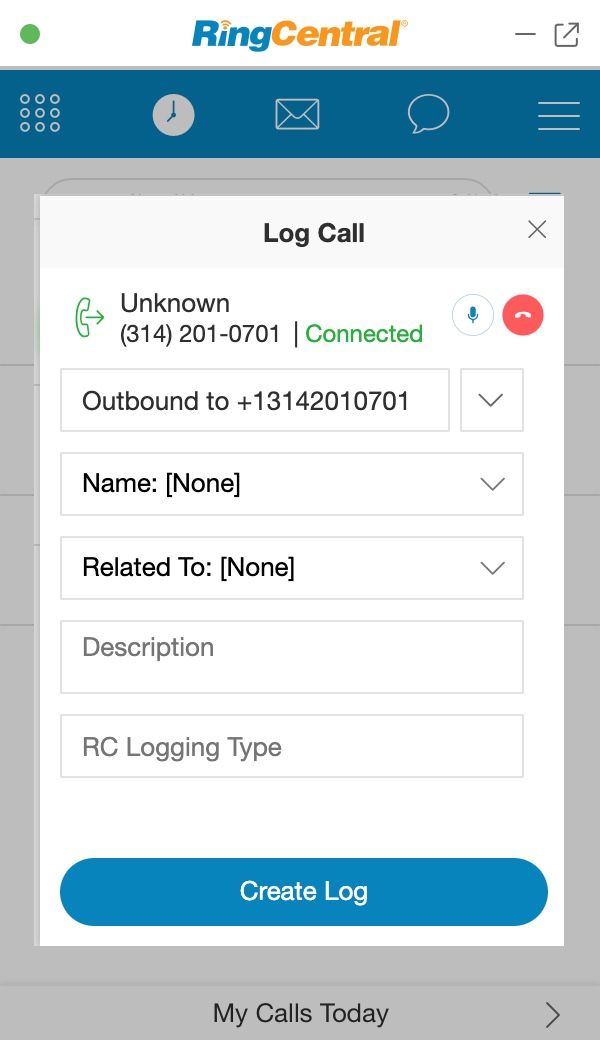
Background: Sales rep needs to take notes every time they place or receive a call.
Pains:
- Limited focus area
- Hard to interact with each field item (example, dropdowns)
- Extra navigation to end or transfer calls
Customer reviews:
“We don’t use RingCentral integration to log calls, because it’s easier to directly use Salesforce instead”
-Samsara
Solution:
Pain relievers:
- Increased focus area
- Well laid-out flows for each field item
- Easy access to call controls (instead of going to the call page)
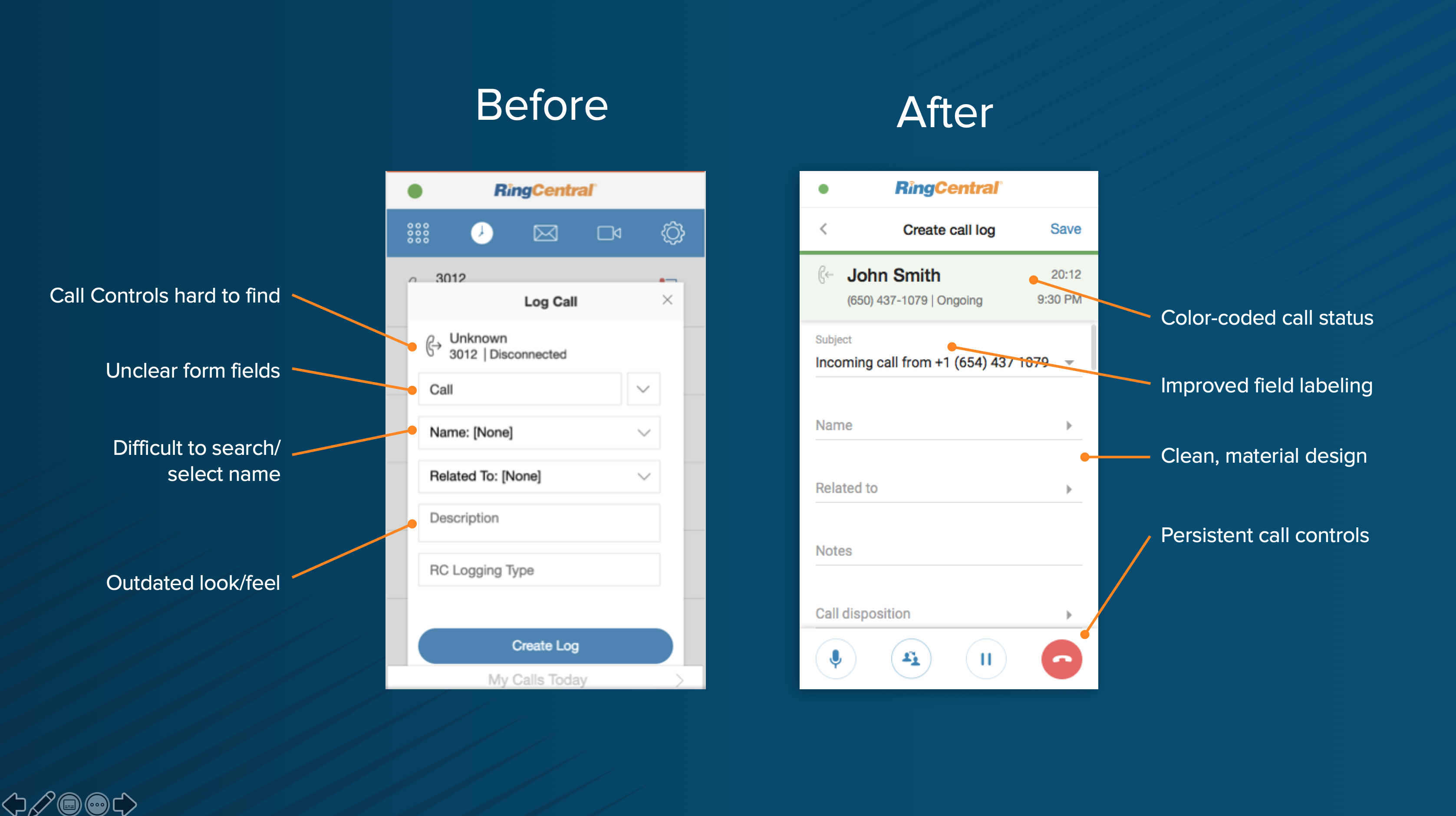
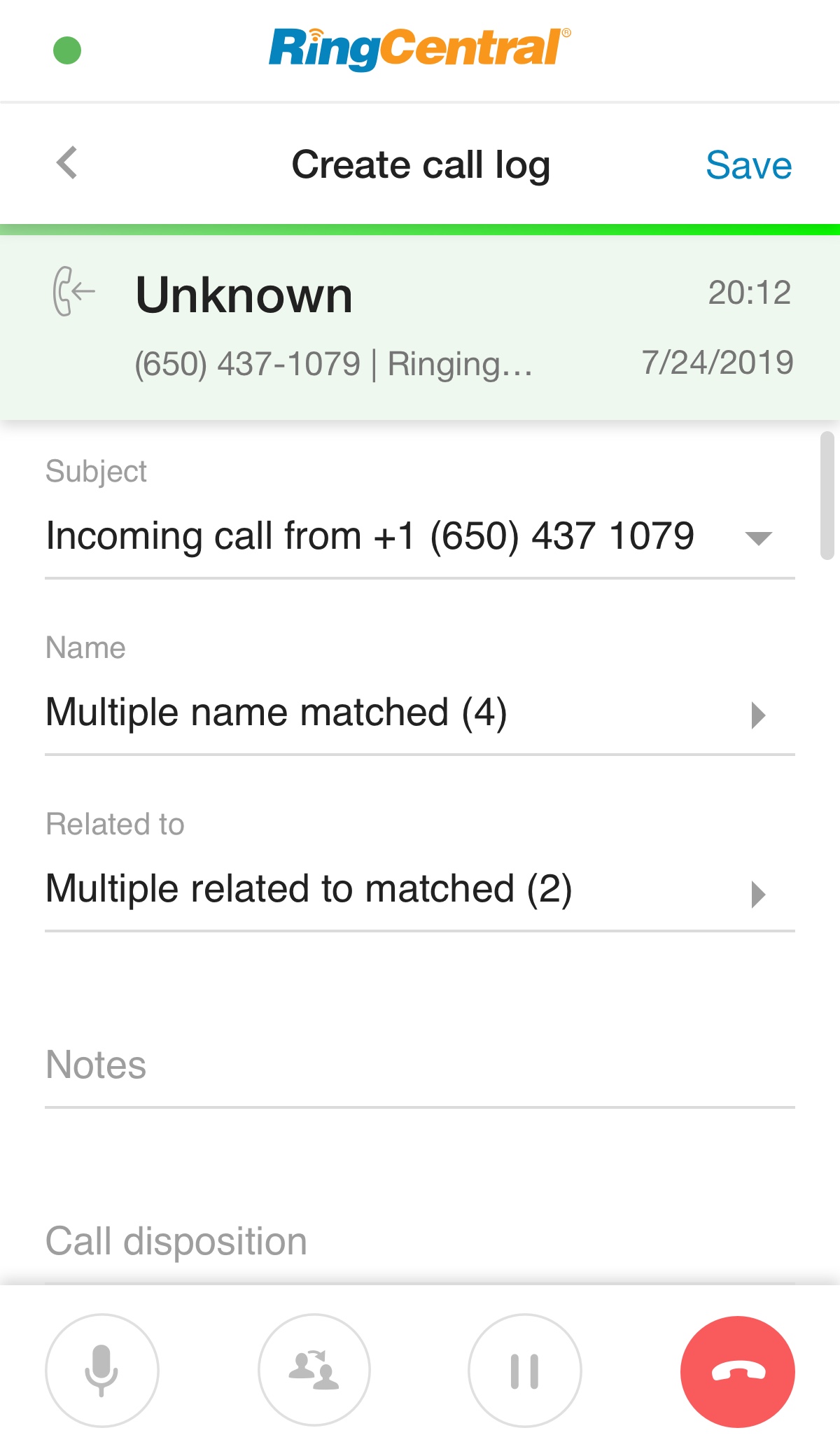
Before - After Screenshots:
WHAT’S THE CHALLENGE?
WHAT’S THE PROBLEM?
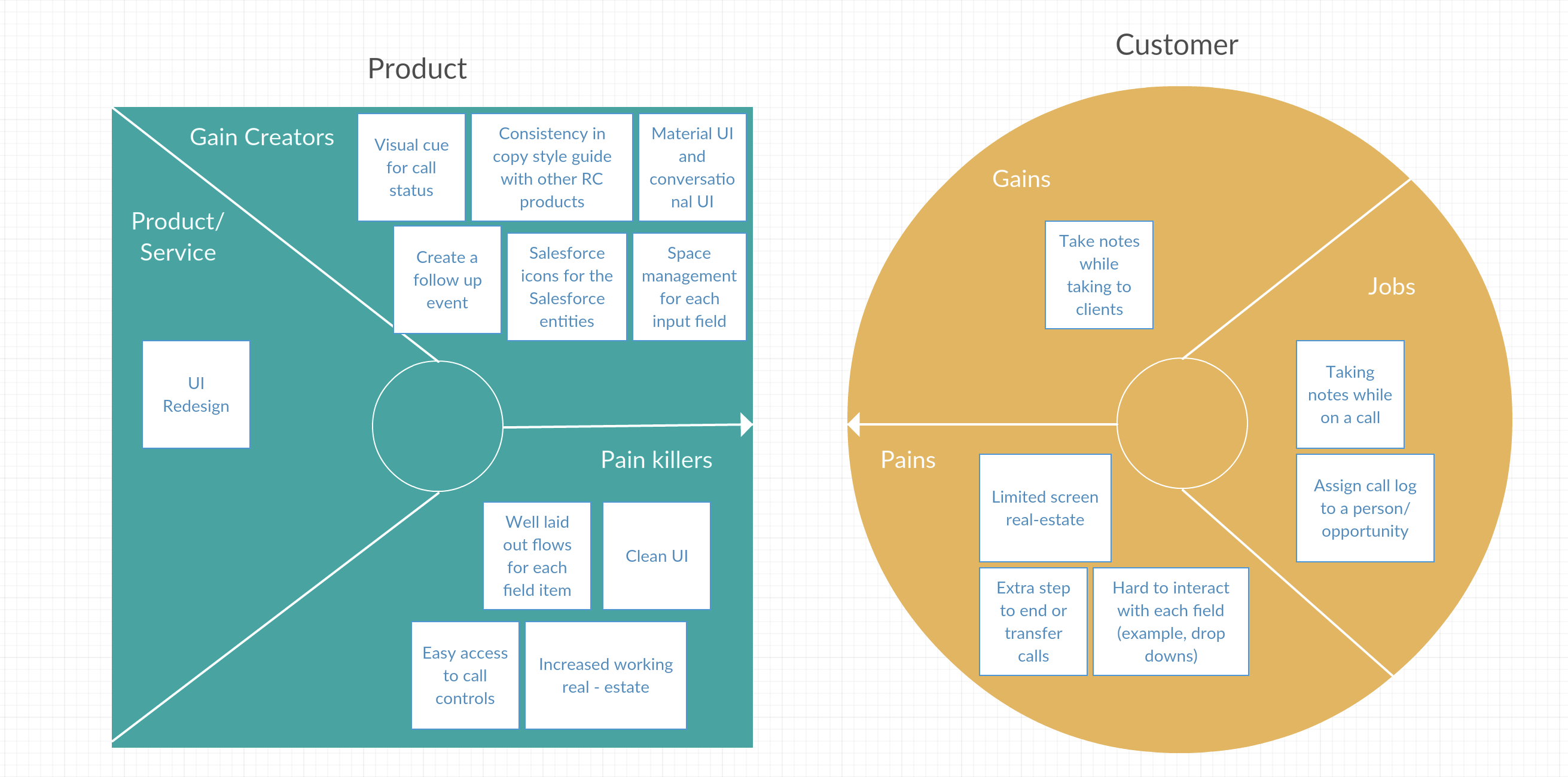
Fig. Value- Proposition Model
RingCentral (RC) integration in Salesforce Lightning occupies a small section of a page (approx. 304 x 500 pixels). In this tiny space, RC needs to provide a comprehensive and meaningful screen to take notes during quick calls.
(Jobs) Aside from taking notes user also needs to -
- Select the name of the person
- Select/create a ticket for the issue
- Maybe create a follow-up
- Have quick access to call controls
- Respond to any new calls
- All in the tiny window.
To make it more challenging, we have another version of the integration for Salesforce Classic with 200x640 pixel dimensions.
Crown’s InfoLink is a flagship in fleet management and data analysis. We were challenged to come up with a concept design to enhance InfoLink’s features and benefit the Forklift operators as well as the Warehouse managers.
WHO ARE WE HELPING?
OUR MARKET RESEARCH
A salesforce call agent:
- Makes calls all-day
- Sometimes to new people, sometimes to people he has already contacted before
- He is on the look-out for incoming calls
- He needs to be aware of previous conversations with the clients/leads
- Needs quick access to call controls (preferably 1 click) instead of nested options
- Doesn't want to spend time looking for things in a tiny app
Crown Equipment has many competitors and to give them an edge we wanted to understand their what their competitors were already offering.
We realized that all companies are:

SOLUTION
- Take over the entire window
Reason - Working area increases and the window becomes more focused. It is similar to Dialpad. This would decrease unneeded distractions. The previous design was a popup (less area) over a call log screen(unneeded distractions). - Open as soon as the call is answered
Reason - encourage the users to interact with the call log page instead of using the Salesforce website’s call log area. - Display call information right on the top and call control on the bottom
Reason - Space allocated to all the call details needed by the agent for the call he is on. Also, no navigation required for primary actions of call control. - Different call status visually depicted
Reason - A visual indicator can immediately tell the user what the call status is - just by a glance. This visual call change is on the call details section of the page, making it easier to form a connection between the colors and the call. (To completely avoid confusion, the call status is also mentioned in this section).
- “Name” and “Related to” lead to another page
Reason- Previously it was a dropdown for some “Matched” names or related to tickets/objects, but a dropdown was not scalable in cases of more than 10 items in the list. Aside from that, the layout of a full-page takeover provides us with an opportunity to introduce a search and another section called “Other”. “Other” displays other salesforce contacts, other than the ones been matched. - Create a salesforce entity from right within the name/related to flow
Reason - In case the agent didn’t find what he was looking for, he can always create right from this screen. Previously this feature was only found in the call history screen of the app and was comparatively hidden. - Use Salesforce icons for the entities
Reason- Salesforce users' familiarity with the Salesforce UI and it's elements.
- Create a follow up from right here
Reason - A client almost always needs to be followed up with for good client experience. Here, the agent can create a Salesforce event "Follow - up" from right within the RC integration's call log page.
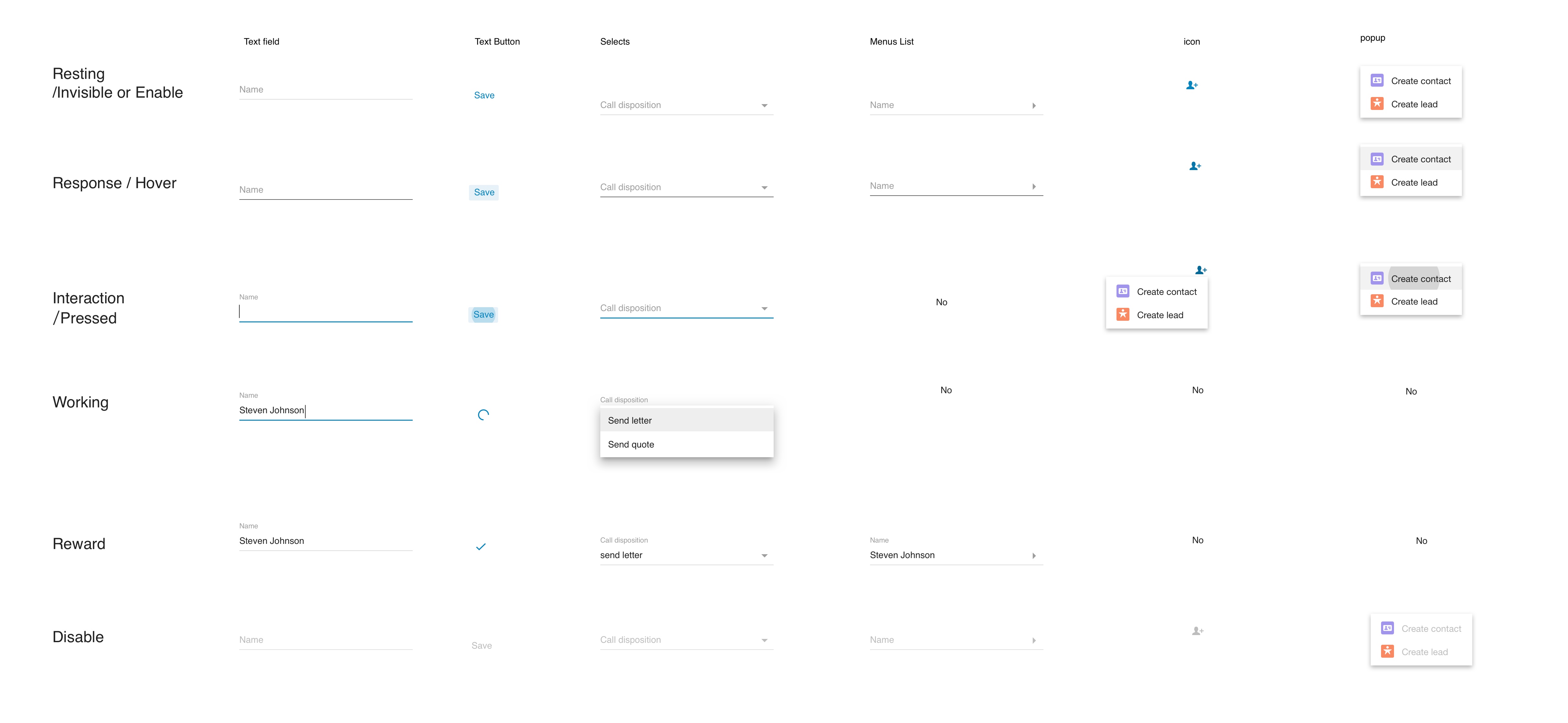
- Use material UI for the layout of the elements
Reason - User’s familiarity with google’s material UI as well as easier for implementation. - A new call will overlay the call info section instead of overtaking the page
Reason - New call will cover the call details section right at the top since it is the only non-interactable section on the screen.
- Salesforce classic
Reason: The new call log design needed to be responsive in a manner to incorporate the dimensions of Salesforce Classic (200x640 pixels).
WAS IT IMPLEMENTED?
WHAT’S OUR FINAL SOLUTION?
This was scheduled for Salesforce 6.4 release of RingCentral Integration. It will be released to a set of users initially and soon to everyone using RingCentral integration in Salesforce.
We picked IPS Safety to be our solution. It would be a new device that would compose of:
LEARNING MOMENTS
Proud moment:
As the visual designer was on PTO, I was entrusted with the visual design on this high priority project by the VP of Integrations, David Lee, and the PM on this project at RingCentral. Besides a clean Vxd, I provided them with the color-coded call status innovation, which none of our products or competitors currently do. Creating pixel-perfect Vxd was a learning curve that I am now encouraged to continue growing on.
Major learnings:
Conversational UI of the elements by studying Material UI.